Supported restriction types for the getRecordListForTableWithQuery operation
The following restriction types are supported in JSON queries used with the getRecordListForTableWithQuery operation.
On this page:
Condition (Boolean)
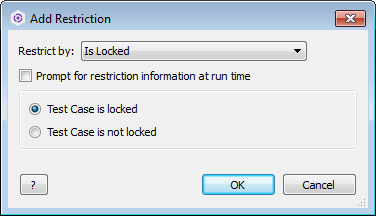
Limits results to items with check box fields that are selected or cleared, or items with or without specific attributes. For example, you can retrieve issues with file attachments.
The following dialog box from Perforce ALM shows an example of this restriction type. See the desktop client documentation for more information.
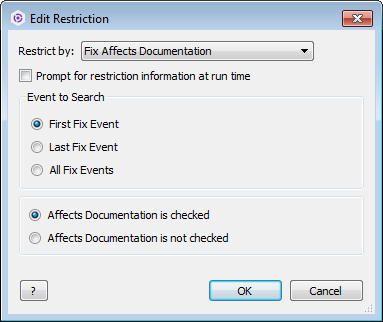
Condition restrictions can also be set to return results from the first, last, or all workflow events.
Examples
Test case is locked—JSON boolean
{'Is Locked': true}
Test case is locked—string
{'Is Locked': 'True'}
Test case is locked—object
{'Is Locked': {'<bool>': true}}
{'Is Locked': {'<bool>': 'true'}}
Affects Documentation is selected in the first Fix event
{'Fix Affects Documentation': {'<bool>': true, '<event>': 'first'}}
Date
Limits results to items that do or do not contain a date range or time period. For example, you can retrieve issues entered in the past month based on the Date Entered field.
The following dialog box from Perforce ALM shows an example of this restriction type. See the desktop client documentation for more information.

Examples
Date Entered is from 3/17/2015 through 3/17/2015
{'Date Entered': '2015-03-17'}
{'Date Entered': {'<matches>': true, '<from>': '2015-03-17', '<through>': '2015-03-17'}}
{'Date Entered': {'<from>': '2015-03-17', '<through>': '2015-03-17'}}
Date Entered is greater than or equal to 3/17/2015
{'Date Entered': {'<from>': '2015-03-17'}}
Date Entered is less than or equal to 3/17/2015
{'Date Entered': {'<through>': '2015-03-17'}}
Date Entered is this week
{'Date Entered': 'This Week'}
{'Date Entered': {'<named>': 'This Week', '<matches>': false}}
Valid values for the time period match the list in the restriction dialog box in the Perforce ALM Client.
Date Entered is in the last 5 days
{'Date Entered': {'<in>': 'Last', '<number>': 5, '<units>': 'Days'}}
Valid values for the units match the list in the restriction dialog box in the desktop client.
Date Entered is in the next 7 weeks
{'Date Entered': {'<in>': 'Next', '<number>': 7, '<units>': 'Weeks'}}
Date Entered is not from 3/17/2015 through 3/17/2015
{'Date Entered': {'<matches>': false, '<from>': '2015-03-17', '<through>': '2015-03-17'}}
Date/time
Limits results to items that do or do not contain a date/time range. For example, you can retrieve issues added to the project during a specified time period based on the Date Created field.
The following dialog box from Perforce ALM shows an example of this restriction type. See the desktop client documentation for more information.

Examples
Date Created is from 3/17/2015 2:41:37 PM through 3/17/2015 2:41:37 PM
{'Date Created': '2015-03-17 14:41:37'}
Date Created is from 3/17/2015 2:41:37 AM through 3/17/2015 2:41:37 AM
{'Date Created': '2015-03-17 02:41:37'}
{'Date Created': {'<matches>': true, '<from>': '2015-03-17 02:41:37', '<through>': '2015-03-17 02:41:37'}}
{'Date Created': {'<from>': '2015-03-17 02:41:37', '<through>': '3/17/2015 02:41:37'}}
Date Created is greater than or equal to 3/17/2015 2:41:37 AM
{'Date Created': {'<from>': '2015-03-17 02:41:37'}}
Date Created is less than or equal to 3/17/2015 2:41:37 AM
{'Date Created': {'<through>': '2015-03-17 02:41:37'}}
Decimal
Limits results to items that do or do not contain numbers inside or outside of a specified range. For example, you can retrieve items with 2.5 hours or less in the Estimated Effort field for the Estimate workflow event.
The following dialog box from Perforce ALM shows an example of this restriction type. See the desktop client documentation for more information.

Examples
Decimal is between 5.50 and 5.50
{'Decimal': 5.5}
{'Decimal': {'<from>': 5.5, '<to>': 5.5}}
{'Decimal': {'<matches>': true, '<from>': 5.5, '<to>': 5.5}}
Decimal is not between 5.00 and 6.00
{'Decimal': {'<matches>': false, '<from>': 5.0, '<to>': 6.0}}
{'Decimal': {'<matches>': false, '<from>': 5, '<to>': 6}}
Folder
Limits results to items that are or are not in any, all, or only specified folders or child folders. For example, you can retrieve manual test runs stored in the Wysi CRM Test Library folder.
The following dialog box from Perforce ALM shows an example of this restriction type. See the desktop client documentation for more information.

Examples
Item is in the specified folders
{'Folders': 1}
{'Folders': [0, 1, 3]}
{'Folder': '/Public/Release Schedules/WysiWrite 1.0/Features In Development'}
{'Folders': ['/Public/Release Schedules/WysiWrite 1.0', '/Public/Release Schedules/WysiWrite 1.0/Features In Development']}
{'Folders': {'<use>': 'any', '<folders>': ['/Public/Release Schedules/WysiWrite 1.0', '/Public/Release Schedules/WysiWrite 1.0/Features In Development']}}
Item is in all the specified folders
{'Folders': {'<use>': 'all', '<folders>': ['/Public/Release Schedules/WysiWrite 1.0', '/Public/Release Schedules/WysiWrite 1.0/Features In Development']}}
Item is in exactly the specified folders
{'Folders': {'<use>': 'exactly', '<folders>': ['/Public/ReleaseSchedules/WysiWrite 1.0', '/Public/Release Schedules/WysiWrite 1.0/Features In Development'], '<recursive>': false}}
{'Folders': {'<use>': 'exactly', '<folders>': ['/Public/ReleaseSchedules/WysiWrite 1.0', '/Public/ReleaseSchedules/WysiWrite 1.0/Features In Development'], '<matches>': true}}
Item is in the specified folders recursively (including all child folders)
{'Folders': {'<use>': 'any', '<folders>': ['/Public/Release Schedules/WysiWrite 1.0', '/Public/Release Schedules/WysiWrite 1.0/Features In Development'], '<recursive>': true}}
Item is in all the specified folders recursively (including all child folders)
{'Folders': {'<use>': 'all', '<folders>': ['/Public/Release Schedules/WysiWrite 1.0', '/Public/Release Schedules/WysiWrite 1.0'/Features In Development'], '<recursive>': true }}
Item is in exactly the specified folders recursively (including all child folders)
{'Folders': {'<use>': 'exactly', '<folders>': ['/Public/Release Schedules/WysiWrite 1.0', '/Public/Release Schedules/WysiWrite 1.0/Features In Development'], '<recursive>': true}}
Item is not in any of the specified folders
{'Folders': {'<use>': 'any', '<folders>': ['/Public/Release Schedules/WysiWrite 1.0', '/Public/Release Schedules/WysiWrite 1.0/Features In Development'], '<matches>': false}}
List value
Limits results to items that do not contain any, all, or exactly the values selected in a pop-up menu. For example, you can retrieve issues with specific values selected in the Product field.
The following dialog box from Perforce ALM shows an example of this restriction type. See the desktop client documentation for more information.

Examples
Values selected in the Reproduced field match the specified values
{'Reproduced': 'Always'} // Only this value selected
{'Reproduced': 0} // Only this value by ID selected
{'Reproduced': [0, 1, 2]} // Only these values by ID selected
{'Reproduced': ['<not set>', 'Always', 'Sometimes']} // Only specific values selected
{'Reproduced': {'<matches>': true, '<items>': ['<not set>', 'Always', 'Sometimes']}} // Only specific values selected
Values selected in the Reproduced field do not match the specified values
{'Reproduced': {'<matches>': false, '<items>': ['<not set>', 'Always', 'Sometimes']}}
Number
Limits results to items that do or do not contain non-decimal numbers in a range or list. For example, you can retrieve all issues numbered from 200 to 400 only.
The following dialog box from Perforce ALM shows an example of this restriction type. See the desktop client documentation for more information.

Examples
Number is 25
{'Number': 25}
{'Number': [25]}
{'Number': {'<numbers>': [25]}
{'Number': {'<matches>': true, '<numbers>': 25}}
Number is in list {25, 26, 27}
{'Number': [25, 26, 27]}
{'Number': {'<numbers>': [25, 26, 27]}}
{'Number': {'<matches>': true, '<numbers>': [25, 26, 27]}
Number is greater than or equal to 26
{'Number': {'<from>', 26}}
Number is less than or equal to 26
{'Number': {'<to>', 26}}
Number is between 26 and 100
{'Number': {'<from>': 26, '<to>': 100}}
Number is not 25
{'Number': {'<matches>': false, '<numbers>': [25]}}
Number is not in list {25, 26, 27}
{'Number': {'<matches>': false, '<numbers>': [25, 26, 27]}}
Number is less than 26
{'Number': {'<matches>': false, '<from>', 26}}
Number is greater than 26
{'Number': {'<matches>': false, '<to>', 26}}
Number is not between 26 and 100
{'Number': {'<matches>': false, '<from>': 26, '<to>': 100}}
Requirement document
Limit results to requirements that are or are not in any, all, or only the selected requirement documents. For example, you can retrieve requirements that are in multiple documents.
The following dialog box from Perforce ALM shows an example of this restriction type. See the desktop client documentation for more information.

Examples
Item is in the specified documents
{'Requirement Documents': 'WysiChart 1'}
{'Requirement Documents': ['WysiChart 1', 'WysiChart 3']}
{'Requirement Documents': 0} // Uses document ID
{'Requirement Documents': [0, 1, 3]]} // Uses document IDs
{'Requirement Documents': {'<use>': 'any', '<documents>': ['WysiChart 1', 'WysiChart 3']}}
Item is in all of the specified documents
{'Requirement Documents': {'<use>': 'all', '<documents>':['WysiChart 1', 'WysiChart 3']}}
Item is in exactly the specified documents
{'Requirement Documents': {'<use>': 'exactly', '<documents>': ['WysiChart 1', 'WysiChart 3']}}
{'Requirement Documents': {'<use>': 'exactly', '<documents>': ['WysiChart 1', 'WysiChart 3'], '<matches>': true}}
Item is not in the specified documents
{'Requirement Documents': {'<use>': 'any', <documents>': ['WysiChart 1', 'WysiChart 3'], '<matches>': true}}
String
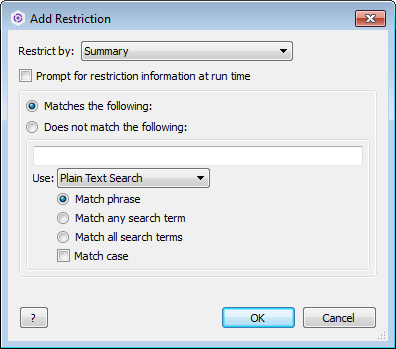
Limits results to items that do or do not contain all, any, or the exact specified text. For example, you can retrieve issues that contain ‘web server’. These restrictions also apply to hyperlinks.
The following dialog box from Perforce ALM shows an example of this restriction type. See the desktop client documentation for more information.
Examples
Summary contains the case insensitive phrase "group box"
{'Summary': 'group box'}
{'Summary': {'<string>': 'group box', '<use>': 'phrase'}}
{'Summary': {'<string>': 'group box', '<match-case>': False}
{'Summary': {'<matches>': true, '<string>': 'group box', '<match-case>': false}
Summary contains any case insensitive words in {"group", "box"}
{'Summary': ['group', 'box']}
{'Summary': {'<use>': 'any', '<string>': 'group box'}}
{'Summary': {'<use>': 'any', '<items>': ['group', 'box']}}
{'Summary': {'<use>': 'any', '<items>': ['group', 'box'], '<match-case>':false}}
Summary contains all case insensitive word in {"group", "box"}
{'Summary': {'<use>': 'all', '<items>':['group', 'box']}}
{'Summary': {'<use>': 'all', '<string>':'group box'}}
{'Summary': {'<use>': 'all', '<string>':'group box', '<match-case>': false}}
Summary contains the case sensitive phrase "group box"
{'Summary': {'<string>': 'group box', '<use>': 'phrase, '<match-case>': true}}
Summary contains any case sensitive word in {"group", "box"}
{'Summary': {'<items>': ['test', 'me'], '<use>': 'any', '<match-case>': true}}
Summary contains all case sensitive words in {"group", "box"}
{'Summary': {<items>': ['test', 'me'], '<use>': 'all', '<match-case>': true}}
Summary does not contain the case insensitive phrase "group box"
{'Summary': {'<matches>':false, '<string>': 'group box', '<use>': 'phrase'}}
Summary does not contain any case insensitive words in {"group", "box"}
{'Summary': {'<matches>': false, '<items>': ['group', 'box'], '<use>': 'any'}}
Summary does not contain all case insensitive words in {"group", "box"}
{'Summary': {'<matches>': false, <items>': ['group', 'box'], '<use>': 'all'}}
Summary does not contain the case sensitive phrase "group box"
{'Summary': {'<matches>': false, '<string>': 'group box', '<use>': 'phrase', '<match-case>': true}}
Summary does not any case sensitive words in {"group", "box"}
{'Summary': {'<matches>': false, '<string>': 'group box', '<match-case>': true, '<use>':'any'}}
Summary contains all case sensitive words in {"group", "box"}
{'Summary': {'<matches>': false, '<string>': 'group box', '<use>': 'all', '<match-case>': true}}
Search type—plain or wildcard
{'Summary' : {'<string>': 'test123', '<search-type>': 'plain'}}
{'Summary' : {'<string>': 'test*123', '<search-type>': 'wildcard'}}
String range (version field)
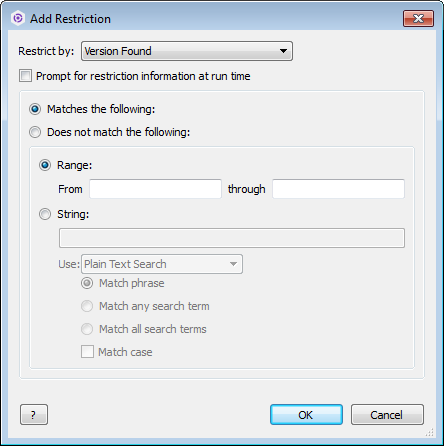
Limits results to items that do or do not contain a specific version range or any, all, or the exact version specified. For example, you can retrieve issues found in releases 4.0.0 through 4.1.5 based on the Version Found field.
The following dialog box from Perforce ALM shows an example of this restriction type. See the desktop client documentation for more information.
Examples
Version Found is between "2015.1.0" and "2015.1.0"
{'Version Found': '2015.1.0'}
{'Version Found': {'<from>': '2015.1.0', '<through>': '2015.1.0'}}
Version Found is greater than or equal to "2015.1.0"
{'Version Found': {'<from>': '2015.1.0'}}
Version Found is less than or equal to "2015.1.0"
{'Version Found': {'<to>': '2015.1.0'}}
Version Found contains the case insensitive phrase "2015.1.0"
{'Version Found': {'<string>': '2015.1.0'}}
Version Found contains any case sensitive word in "2015.1.0"
{'Version Found': {'<string>': '2015.1.0', '<match-case>': true, '<use>': 'any'}}
Version Found does not contain all case sensitive words in "2015.1.0"
{'Version Found': {'<string>': '2015.1.0', '<match-case>': true, '<use>': 'all', '<matches>': false}}
Search type—plain or wildcard
{'Version Found': {'<string>': '2015*Build 1', '<search-type>': 'wildcard'}}
{'Version Found': {'<string>': '2015.1.1 Build 1', '<search-type>': 'plain'}}
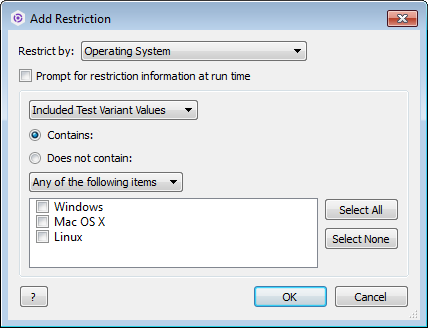
Test case variant
Limits results to test cases that do or do not contain any, all, or only values specified as included or excluded test variant values. You can also limit results by supported variant values, which finds test cases that do not explicitly include or exclude selected values. For example, you can retrieve test cases with Windows as an included test variant value based on the Operating System variant .
The following dialog box from Perforce ALM shows an example of this restriction type. See the desktop client documentation for more information.
Examples
Item contains Windows as an included test variant in the Operating System variant list
{'Operating System': 'Windows'}
{'Operating System': 1}
{'Operating System': [1, 2]}
{'Operating System': ['Windows', 'Mac OS X']}
{'Operating System': {'<items>': ['Windows', 'Mac OS X']}
{'Operating System': {'<items>': ['Windows', 'Mac OS X'], '<use>': 'any', '<coverage>': 'included', '<matches>': true}
Item contains Windows or Mac OS X as excluded test variants in the Operating System variant list
{'Operating System': {'<items>': ['Windows', 'Mac OS X'], '<use>': 'any', '<coverage>': 'excluded', '<matches>': true}
Item contains Windows or Mac OS X as supported test variants in the Operating System variant list
{'Operating System': {'<items>': ['Windows', 'Mac OS X'], '<use>': 'any', '<coverage>': 'supported', '<matches>': true}
User list value
Limits results to items that do or do not contain specific users, users in specific security groups, or users in a specific company, division, or department. For example, you can retrieve issues entered by users in the Quality Assurance security group.
The following dialog box from Perforce ALM shows an example of this restriction type. See the desktop client documentation for more information.

Examples
Currently Assigned To user is Analyst, Jane B
{'Currently Assigned To': 'Analyst, Jane B'}
Currently Assigned To users are Analyst, Jane B and Developer, Joe C
{'Currently Assigned To': ['Analyst, Jane B', 'Developer, Joe C']}
Currently Assigned To users are in the Business Analysts security group
{'Currently Assigned To': {'<groups>': ['Business Analysts']}}
Currently Assigned To users are in the Engineering and Engineering Mgr security groups
{'Currently Assigned To': {'<groups>': ['Engineering', 'Engineering Mgr']}}
Currently Assigned To users are in the WysiCorp company
{'Currently Assigned To': {'<company>': 'WysiCorp',}
Currently Assigned To users are in the WysiCorp company, Engineering department, Quality Assurance department
{'Currently Assigned To': {'<company>': 'WysiCorp', '<division>': 'Engineering', '<department>': 'Quality Assurance'}}
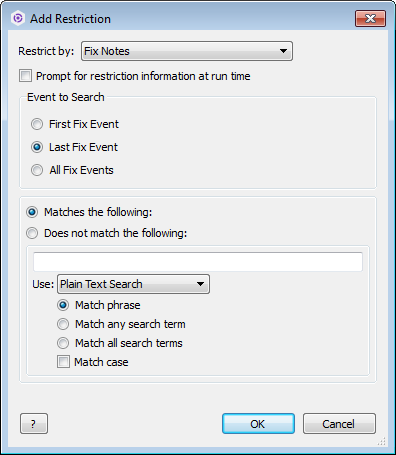
Workflow event field
Limits results to items that match the specified criteria in the first, last, or all instances of a workflow event on an item. Workflow event fields can be different types, such as string or date/time. For example, you can retrieve issues with a specific Fixed By user on the first instance of the Fix event in issues.
The following dialog box from Perforce ALM shows an example of this restriction type.
Examples
Item contains the case insensitive phrase "group box" in the Notes field in the last instance of the Fix event
{'Fix Notes': 'group box'}
{'Fix Notes': {'<string>': 'group box', '<use>': 'phrase'}}
{'Fix Notes': {'<Event>': 'last', '<string>': 'group box'}}
Item contains the case insensitive phrase "group box" in the Notes field in the first instance of the Fix event
{'Fix Notes': {'<Event>': 'first', '<string>': 'group box'}}
Item contains the case insensitive phrase "group box" in any instance of the Fix event
{'Fix Notes': {'<Event>': 'all', '<string>': 'group box'}}
Workflow state attribute
Limit results to items to items with workflow states that have an open or closed attribute. For example, you can retrieve requirements with a Closed attribute.
The following dialog box from Perforce ALM shows an example of this restriction type.

Examples
State attribute is Open
{'State Attribute': 'Open'}
{'State Attribute': 'open'}
State attribute is Closed
{'State Attribute': 'Closed'}
{'State Attribute': 'closed'}