Change the Jira instance location
If you move the Jira instance that a Perforce ALM project is connected to, you need to update the instance location in ALM. See Configure the Jira integration.
If you want to use a different Jira instance for the project, all existing Jira items are automatically detached from ALM items when you update the location.
1. Choose Tools > Administration > Jira Integration.
The Jira Integration dialog box opens.
2. Make any changes to the Jira instance location.
3. Click Save.
If items in the project have attached Jira items from the old instance, you are prompted to move or replace the instance.
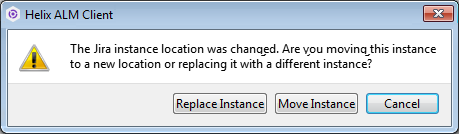
4. Indicate if you moved or replaced the instance.
- If the instance was moved to a different location, click Move Instance. The location is saved and no changes are made to ALM items.
- To connect to a different instance, click Replace Instance. You are prompted to detach all Jira items from items in the ALM project. Continue with step 5.
5. Click Detach All.
You are prompted to confirm detaching all Jira items from ALM items.
6. Click Detach All again.
All Jira items are detached from ALM items in the project.
7. Click Save to save the changes.