VersIC preferences
Allows the user to set preferences for the current Cadence session. These can be saved (default location is ~/.methodics/versic/versic.conf) and will be reloaded in a subsequent session (unless user preferences are disabled with VSC_IGNORE_USER_PREFS)
Automatic operations preferences
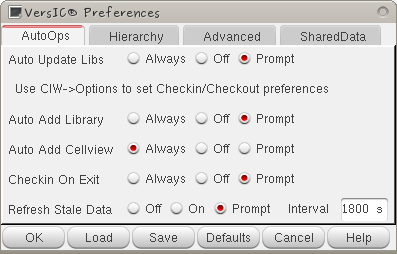
Auto Update Libs
Will update the working copy version of that library to the HEAD in the repos the first time it is accessed in the Cadence session
Cadence Autocheckout Preferences
VersIC uses the standard Cadence GDM checkout preferences. See your Cadence documentation for more details
Auto Add Library
Automatically check-in a new library on creation
Auto Add Cellview
Automatically check-in a new cellview on creation
Checkin On Exit
When VersIC exits it can optionally check to see if there any checkedout/modified cellviews in the users working copy and bring up a form to help them decide what to do with these. Often exiting Cadence with local checkouts is bad practice as it blocks other users from working on these cells and will require some admin help to unlock the cells.
Stale Data Check
With this set, VersIC will poll the repository for changes. If changes are found the workspace can be updated automatically (On) or the user is asked if the update should be done (Prompt).
Hierarchy Preferences

Reference Libs
Hierarchical operations will not traverse into these libraries.
Warn if hierarchy contains more than <number> cellviews
Informs that the hierarchical operation is working on a large dataset and may take some time to complete.
Advanced Preferences
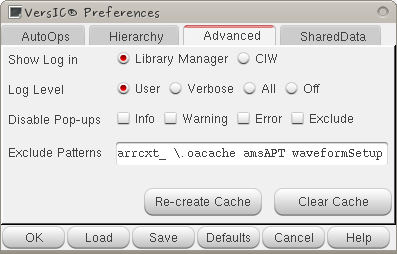
Log Level
Sets the verbosity of the log messages are delivered to the CIW/LibManager (This does not affect the contents of the VersIC log file).
- User - default setting; only significant log information is printed
- Verbose - provides additional logging information, such as details of p4/svn commands
- All - prints all VersIC log messages (recommended only for debugging purposes)
- Off - Do not print any VersIC log messages
To get the name of the current log file, type 'VSC_LOG_FILE' in the CIW.
Disable Dialogs
Allows you to turn off the different levels of dialog box. Be aware that doing so may cause you to miss important information.
- Info - disable information dialog boxes
- Warning - disable warning dialog boxes
- Error - disable error dialog boxes (not recommended)
- Exclude - disable dialogs that warn if data is being excluded from add due to VSC_EXCLUDE_PATTERNS
Exclude Patterns
Files/directories containing these patterns (in the path relative to the workarea) will not be automatically added to VersIC
VersionControl Preferences
In the Synopsys Custom Designer Version of the VersIC Preferences form there is a "Version Control" tab that allows control of the Custom Designer Version Control variables as there is no dedicated GUI for this with Custom Designer.