VersIC support
Contact
Online resources
Perforce online documentation
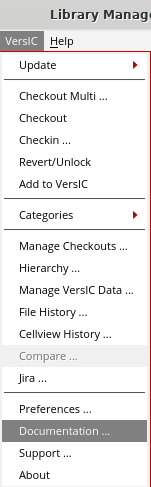
The online documentation can be accessed from the Library Manager VersIC pulldown:
VSC_DOCS_URL = https://help.perforce.com/methodics/
You will be authenticated automatically if VSC_DOCS_USER and VSC_DOCS_PASS are set
VSC_DOCS_USER = "<user>"VSC_DOCS_PASS = "<password>"
Note that this assumes your Cadence session has a working browser available.
Creating and managing support tickets
Support configuration
Administrators can change the instructions in the Support form (for example, to direct users to an internal support mechanism). See versic.conf for details.
Files included in the Support bundle
Basic platform information is included with the log files telling us what release of the OS you're using, Perforce/Subversion versions etc and typically this is enough to identify an issue.
Support will create the file /tmp/$USER-versic/$USER_supportlogsXX (XX is a random, unique string) and includes the following files:
- vsctmp* - Internal temp files from VersIC during its calculations (mostly SVN/P4 argument lists)
- vscIPC* - VersIC SVN/P4 IPC calls
- cdsenv - Cadence environment settings
- cds.lib and cds.lib.project - Cadence cds.lib files
- CDS.log.XX - Cadence log file
- df - Disk space usage
- env - shell settings
- memreport - Memory usage
- processes - Current process list
- svninfo - Version of Subversion or Perforce
- uname - OS version
- userText - Ticket description text
- versic.conf - Active VersIC configuration file
- versicDisplayProps - Library Manager display props file
- vscGdmLog.XX - VersIC GDM logs
- vscLog.XX - VersIC log file
- vscSyncFile - VersIC Sync File
Note: no design data is included in the Support bundle, but it will library and cell names. Your company policies may be to treat these as proprietary or sensitive information
WGET usage
Users may use wget to expedite downloading their VersIC installation file. This is often more convenient than navigating to the downloads site. The download is available at https://mdx.jfrog.io/ui/native/versic/release.
Unix> wget --http-user=<user> --http-password=<password> <url>.tgz