VersIC IPLM IP Catalog
Overview
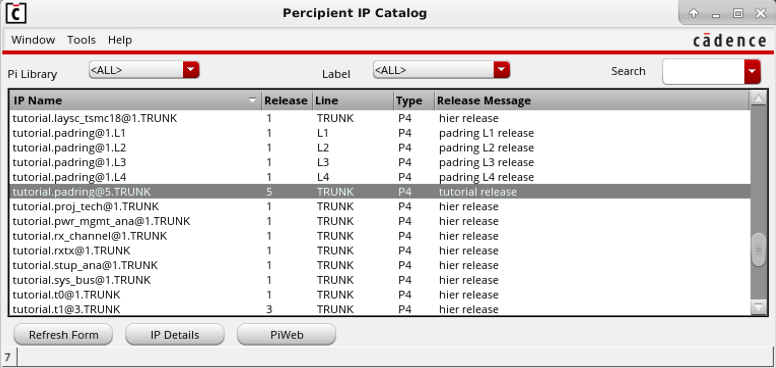
The VersIC PI IP Catalog is a VersIC interface into the IPLM (Pi) Catalog. The catalog provides filtering by IP Library and Labels, and text search across the IP field values. Detailed information on an IP can be pulled up using the IP Details button, and the IP's IPLM Web link can be brought up in a browser for even more information on the IP.
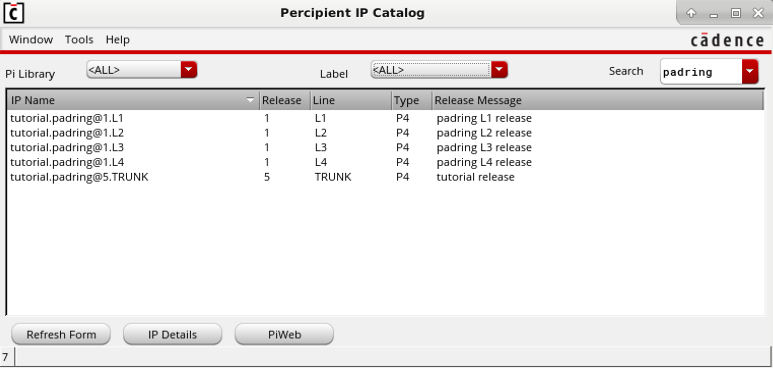
Text Search
The IP Catalog form enables a text based search across the fields of the IP records. Here we search for IPs with 'padring' in any of their fields.
IP Details
Selecting an IP in the catalog and clicking 'IP Details' will bring up details on the IP. The detailed information is equivalent to running 'pi ip list -v <IP>' on the command line.
IP Version tutorial.padring@5.TRUNK:
    Description               - pad ring
    DM type                   - Perforce (P4)
    Host                      -
    Repo Path                 - //mdx_test/tutorial/padring/TRUNK
    Resources                 - tutorial.MS90G@1.TRUNK
                                tutorial.io5v@1.TRUNK
                                tutorial.io_tsmc18@1.TRUNK
    Current Aliases           - HEAD LATEST
    Historic Aliases          -
    Version Message           - tutorial release

    IP created on             - 2020-03-26 14:43:15 -0400 EDT by admin
    Line created on           - 2020-03-26 14:43:15 -0400 EDT by admin
    IP Version created on     - 2020-03-26 14:43:24 -0400 EDT by admin

  Project Properties:
    *                         - --mode both --path blocks/$IP

  Labels:
    analog

  Property Sets:
    CDSPROPS:
      IP Properties:
        CDSCELLS              - [padring,BIAS,schematic] [padring,BIAS,layout]
    basic:
      IP Properties:
        auth_required         - N
        external_ip           - N
        internal_ipid         - INTERN0245G
        ip_lifecycle          - owned
        license_agreement     - INTERNAL
        license_class         - A
        license_expire        - 2025-01-31 07:00:00 -0500 EST (*)
        license_start         - 2018-06-15 08:00:00 -0400 EDT (*)
        owner                 - BU356
        process_name          - MS90G
        process_node          - 90
        vendor_id             - INTERNAL
        vendor_ipid           - INTERNAL
    feature_status:
      IP Version Properties:
        IPCategory            - Category5
        feature1              - OK
        feature2              - Func OK/Non Comp
        feature3              - Some Gaps
        feature4              - Feature Missing
        feature5              - OK
        feature6              - Func OK/Non Comp
        feature7              - Func OK/Non Comp
        project               - tutorial
    global:
      IP Properties:
        target_power          - 50.0 mW
        target_size           - 35.0 sq-mm
      IP Version Properties:
        coverage              - 76.0 %
        power                 - 47.0 mW
        regr                  - 1929 /2000
        size                  - 37.0 sq-mm

  Permissions on IP:
    Owner                     - u:ada u:alan u:george
    Write Permissions         - u:ada u:alan u:george
    Read Permissions          - g:tutorial u:ada u:alan u:george

  Permissions on Line TRUNK:
    Owner                     - u:ada u:alan u:george
    Write Permissions         - u:ada u:alan u:george
    Read Permissions          - g:tutorial u:ada u:alan u:george

  Hooks:
    Post-Release              - /var/tmp/release_hook.bash $LIB $IP $VER $LINE

Found 1 matching object(s).
IPLM Web button
The IPLM Web button will bring up the selected IPV's release page in IPLM Web. There are two environment variables that can be set to configure this link:
MDX_BROWSER=/path/to/the/browser/executable
MDX_PIWEB_SERVER=http://<piweb_server_name>:<piweb_server_port>