VersIC Hierarchy Form
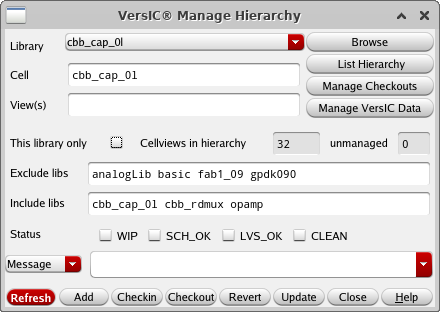
The Hierarchy form performs operations on a hierarchy of managed data. This is useful for situations where you want to lock an entire hierarchy prior to making changes, so as not to be affected by someones else changes during your work. Another example of this could be cherry picking a hierarchy from an unmanaged library and adding this to the data-management system.
-
Library/Cell/View(s) - Identify the hierarchy top level cell or cellview(s).
-
Browse - Select Library/Cell/View from a Library Browser.
-
Refresh Form - Because finding the data in a large hierarchy can take time, the form does not automatically update - use this button to refresh the form after changing the other fields.
-
List Hierarchy - Display the cellviews in the hierarchy in a dialog box.
-
List Checkouts - Display the Manage Checkouts form for the given hierarchy.
-
This library only - Limit hierarchy to data in the same library as the top level cell/cellview. Turn off to follow hierarchy into other libraries.
-
Cellviews in hierarchy / unmanaged - Displays the number of managed and unmanaged cellviews in the hierarchy
-
Exclude libs - Do not traverse into these libraries.
-
Include libs - Follow the hierarchy into these libraries.
-
Status and Message/File fields - Provide a commit message when performing a Checkin or Checkpoint operation
-
Usage Note - The user is prompted to confirm operations which will affect more than a certain number (default 200) of cellviews. This number is controlled by the variable VSC_HIER_WARN and can be set in versic.conf.