VersIC categories
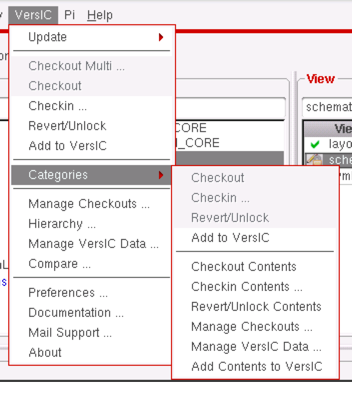
The categories sub-menu is split in two:
- items in the upper half apply to the category file that defines the contents of the category
- items in the lower half apply to the contents of the category (including the contents of any sub-categories)
Category file operations
The category file is stored in the library directory and is called <categoryName>.Cat Most category file operations happen automatically as needed, so these menu items are rarely used.
Checkout
Checkout the category file.
Checkin…
Bring up the checkin form for the category file
Revert/Unlock
Cancel the category file checkout, abandoning any changes.
Add to VersIC
Add the category file to VersIC
Category contents operations
Category contents operations apply to data in sub-categories as well as at the top-level of the category
Checkout Contents
Checkout all cells in the category
Checkin Contents
Bring up the checkin form for all cells in the category
Revert/Unlock Contents
Cancel checkout of all cells in the category
Manage Checkouts
Show the Manage Checkouts form for the category contents
Manage VersIC Data
Show the Manage VersIC Data form for the category contents
Note that not all operations in the Manage VersIC Form are available for category contents
Add Contents to VersIC
Add the category contents to VersIC