GDM Setup
GDM Setup
Prerequisites
The following setup steps assume you have completed these previous stages:
-
Downloading, Installing and Setup of Subversion or Downloading, Installing and Setup of Perforce
-
VSC_INSTALL_DIR is defined
1. Add the VersIC tools/bin directory to the PATH
Add the VersIC tools/bin directory to PATH so that Cadence can find the GDM configuration executable versicgdmconfig:
% set path = ($path $VSC_INSTALL_DIR/tools/bin)
2. Define the path for the VersIC GDM shared libraries
Use one of these methods to tell Cadence where to find the VersIC GDM shared libraries:
(a) Set both the LD_LIBRARY_PATH and GDM_USE_SHLIB_ENVVAR environmental variables:
% setenv LD_LIBRARY_PATH $VSC_INSTALL_DIR/tools/lib:$VSC_INSTALL_DIR/tools/lib/64bit:$LD_LIBRARY_PATH % setenv GDM_USE_SHLIB_ENVVAR yesNote: If libgdmversic_sh.so exists in the Cadence installation, it will be used, even if the environment variables point at a different version. VersIC will complain if an old version of GDM is being used. See the LD_LIBRARY_PATH notes on how to deal with this.
Shared library version mismatch - expected "1.2.15", found nil
OR
(b) from Cadence version IC615, you can set CDS_GDM_SHLIB_LOCATION instead of the above:
% setenv CDS_GDM_SHLIB_LOCATION $VSC_INSTALL_DIR/tools/lib:$VSC_INSTALL_DIR/tools/lib/64bit
Note: CDS_GDM_SHLIB_LOCATION will be used even if the libraries exist in the Cadence installation
OR
(c) (not recommended) copy $VSC_INSTALL_DIR/tools/lib/libgdmversic_sh.so and $VSC_INSTALL_DIR/tools/lib/64bit/libgdmversic_sh.so to tools/lib in the Cadence installation
3. Unset the Cadence environment variable GDMNOTLOADLIB
Ensure that the Cadence environment variable GDMNOTLOADLIB is not set:
% unsetenv GDMNOTLOADLIB
4. Enable GDM
To enable GDM, define 'DMTYPE versic' in the library cdsinfo.tag files, e.g.:
CDSLIBRARY
NAMESPACE LibraryUnix
DMTYPE versic
We do not recommend setting DMTYPE in the global cdsinfo.tag
5. Verify GDM is Setup Correctly
To check that GDM is running correctly in your environment try to modify a category from the Library Manager. The following form will open if GDM is running
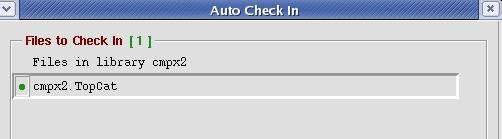
You can also run these commands from the CIW to determine if your library is being managed correctly
gdmstatus(gdmCreateSpecFromDDID(ddGetObj("lib" "cell" "view")) 1)
  > returns a list of filename/gdm-status pairs
where "lib", "cell" and "view" are to be replaced with actual library, cell and view names.
vscGdmCheckAllLibs()
  > will warn about any VersIC-managed libraries which are not using VersIC GDM
Important Note on Cadence's handling of LD_LIBRARY_PATH and how it effects GDM
(This applies if you are using method 2a above)
Unfortunately, Cadence will always use the shared library from the Cadence installation if it exists, even if LD_LIBRARY_PATH is set.
You can confirm this by examining LD_LIBRARY_PATH in the CIW:
env LD_LIBRARY_PATH
Cadence prepends $CDS_INST_DIR/tools/lib to LD_LIBRARY_PATH, so the shared library in $VSC_INSTALL_DIR/tools/lib will not be used.
To ensure you're using the correct version of the VersIC GDM shared library delete 'libgdmversic_sh.so' from the Cadence installation directories - this will allow Cadence to use the shared library from $VSC_INSTALL_DIR/tools/lib.
Accessing VersIC-managed libraries without VersIC
If you access a library which has 'DMTYPE versic' in a Cadence session which does not include VersIC or where the variables GDM_USE_SHLIB_ENVVAR and LD_LIBRARY_PATH are not set, you will get a warning like:
Could not load library 'libgdmversic_sh.so' for DM system 'versic'
To avoid this warning, set the environment variable GDMNOTLOADLIB to any value before starting Cadence.