Working with IPs @HEAD
During the early part of developing an IP, users may rapidly add new features to the IP and in this phase of IP development, having to release an IP for these rapid changes is cumbersome and unnecessary. To address this mode of work, Perforce IPLM supports the notion of IP@HEAD. This page describes IP@HEAD in greater detail, along with implications of using an IP@HEAD that has its own resource hierarchy, as well as IP@HEAD in refer mode.
Fundamentals of IP@HEAD
An IP used at the ‘HEAD’ version (notated as lib.IP@HEAD.line) has a strong implication in ProjectIC. This @HEAD notation implies that the user wants to always use the latest files checked into the DM system for this IP, as well as the latest resource list for this IP.
Standalone IP@HEAD
If an IP has no resources of its own, then using that IP@HEAD implies that IPLM will use the latest files checked into that IP’s DM location as defined in the IP definition. For example, if lib.IP is a Perforce IP and its design files are located in ‘//depot/proj/IP’, then loading or updating a workspace with this IP will always sync the latest files at that Perforce location into the workspace.
IP@HEAD with fixed resources
If an IP has resources of its own that are at various versions, then the ‘@HEAD’ notation implies both the files as well as the resources. Note that the resources themselves are fixed at specific releases in this case.
For example, consider the following IP and its versions in Figure 1:
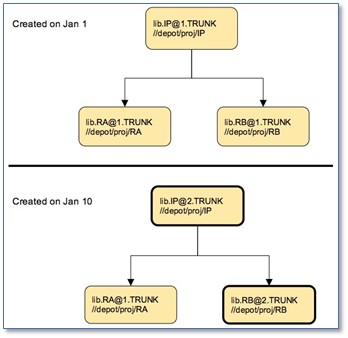
The IP@2 was a release created on Jan 10 by updating one of the resources - lib.RA went from release 1 to release 2.
Note that during this time, lib.IP is in active development, and users are constantly checking in new versions of the files associated with this IP.
If a user loads lib.IP@HEAD into a workspace, then on Jan 1, the workspace will contain lib.RA@1, lib.RB@1, and the latest files located in ‘//depot/proj/IP’ on that date. If at any time between Jan 1 and Jan 10, the user runs a ‘pi update’ in this workspace, then IPLM will fetch the latest files from ‘//depot/proj/IP’ into this workspace, but the resources lib.RA and lib.RB will remain at versions 1 as expected.
However, on or after Jan 10, when a new release of lib.IP is created, if the user were to run ‘pi update’ in the workspace, IPLM will fetch the latest files checked into ‘//depot/proj/IP’, and will also update lib.RB to release 2, since this is now the latest definition of lib.IP.
IP with resources @HEAD
An IP can have resources at the HEAD alias. These resources can have their own resources as well, at fixed releases or at HEAD. In this case, when a user builds a new workspace or updates an existing workspace, IPLM determines the latest files associated with that resource, along with the latest definitions of the resource’s resources to populate the workspace.
For example, consider the following IP and its versions in Figure 2:
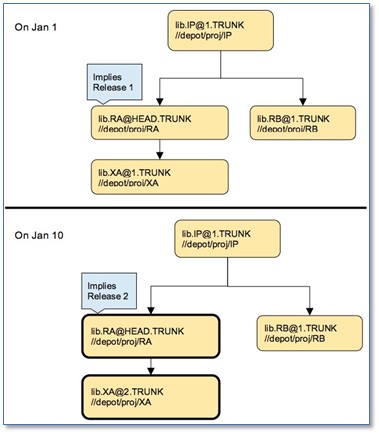
In this example, lib.IP has a resource lib.RA, which also has its own resource lib.XA. This resource is used @HEAD in the definition. On Jan 1, when a workspace is created or updated, then IPLM resolves the resource lib.RA, which at that time happens to its latest release @1. Subsequently, if the user updates his workspace on Jan 10 or after, IPLM will then resolve the resource lib.RA to its latest release at that time, which happens to be @2.
Note that in addition to resolving lib.RA to its latest release at the time of the update/create action, IPLM will fetch all the sub-resources (lib.XA in this case) that are implied by this release of lib.RA, along with the latest files from its DM path (//depot/proj/RA in this case).
Note also that any of the resources, including sub-resources can be set to ‘@HEAD’, and IPLM will always resolve these resources as outlined in the discussion above at the time of workspace create or update.
Using IP@HEAD in Refer Mode
If an IP is used @HEAD in a workspace, and is also in refer mode, then the IP’s design files are in the Perforce IP cache, and the IP itself is a link from that cache location.
IPs that are in refer mode can be put on @HEAD. This implies that IPLM will check out the latest files from the DM path for that IP into the cache and provide the link to that check out. However, the key point to note here is that anyone who creates or updates any workspace which has this IP in refer mode will effectively update the files in the IP cache. Thus, from a single user’s perspective, an IP@HEAD in refer mode cannot be assumed to have a fixed set of files.
The general guideline for users is to keep IPs that are used @HEAD in local mode - since it usually implies that there is some development work happening on that IP. However, if the user is aware of this limitation, there should be no problems in putting an IP @HEAD into refer mode.
IP@HEAD Usage Model
When do we use an IP@HEAD? Typically, during the early phase of a project or an IP’s development, users can consider putting IPs @HEAD in their workspace or in their project configurations. This would be true of IPs that are being co-developed either as part of the project itself, or by some other team as a contribution to the project.
In addition, some subset of IPs that are already well developed or are not seeing any new activity can be set at fixed releases. During the project development, more and more IPs used are slowly moved away from @HEAD to fixed releases. At the end of the project, it is strongly recommended that all IPs should be at fixed releases, to guarantee the files and IPs that were in the final releases of the project.