Properties
Properties and Property sets are used to extend the built in Perforce IPLM data model to include customer specific fields. Licensing, process info, lifecycle status, functional safety compliance, and workflow values are some examples of quantities often tracked as properties. This section describes the configuration options available for Perforce IPLM properties and property sets in both IPLM and PiCLI.Property and Property Set overview
Properties are typed Key/Value pairs that are pre-defined by admins, and provide a way to customize and extend an IP's definition. Once defined, groups of Properties can be added to Property Sets. Property Sets can then be attached to IPs or Libraries. Values can be set for each Property by users that have write access to a given IP. Property sets attached to Libraries will cause all of that Library's IPs and IPVs to inherit the properties included in that property set.
Property and Property Set Permission Considerations
| Function | Permission Level |
|---|---|
| Property Creation/Deletion | Administrator |
| Property Set Creation/Deletion | Administrator |
| Attach Property Set to an IP | IP Owner |
| Set the value of a Property | IP Write |
More information on Permissions can be found on the Permissions Management page.
Property protection
You can enable independent control of IP and Property metadata permissions. See Protected Properties for more information.
Property naming restrictions
A Property name must be a Unicode string from 1 to 1000 characters in length, and should contain only letters, digits and underscores.
| Forbidden Characters | Reason for restriction |
|---|---|
| Cannot start with digits. | Command Parsing |
| Reserved Perforce IPLM fields |
Property types
The available Property value types are:
| Value Type | Description | Example | Notes |
|---|---|---|---|
| string | Unicode string from 1 to 100,000 characters (an empty string is treated as an absence of a value) | 802.11 transceiver ダチヂッ ©2015 | |
| integer | 64-bit signed integer value | -231 | |
| float | 64-bit double-precision floating-point value | 23.7e-9 | |
| boolean | Either true or false | true (true/false), case insensitive | |
| choice | One or more of a defined list of 1 to 1,000 strings (see string) | high speed | User has an option to designate the property as single choice or multiple choice.
|
| datetime | A date/time string in ISO 8601 format, or Unix timestamp. Valid user input:
| 2019-05-20T21:21:44Z |
|
Property Configuration Fields
| Configuration Option | Required | Description |
|---|---|---|
| name | Required | The name of the property. Can be any unicode string. Can be modified after creation. Properties created prior to 2024.1 can have a dash character in the name, but a property name with a dash can interfere with the expected results of queries made in IPLM 2024.1 and later. It is recommended to remove dashes from any property names that have them. |
| value_type | Required | Any one value type, see the Property Types table above Cannot be modified after property creation. |
| target_type | Required | Value is either IP or IPV. IP targeted properties do not change from release to release. IPV targeted properties can have a different value per release. IP properties are used for values that will not change with release. Examples: licensing info, id number, process node IPV properties are used for values that can change from release to release. Examples: simulation results, current area, documentation Cannot be changed after property creation. |
| description | Optional | A description of the property |
| icon | Optional | Icon for display in IPLM Web (not currently used) |
| suffix | Optional | The units of the property value e.g. W, A, m, J, Ω. Unicode string from 1 to 1000 characters. |
| propagate_value | unset assumes False | Only applies to target_type=IPV Properties. By default (propagate_value=False) IPV properties do not propagate from version to version. If propagate_value is set to True the IPV property value will be propagated to each new version of the IP. If the propagate value is False, new IPV releases will be set to the default_value if set, or otherwise be left unset. |
| default_value | Optional | The default value to use if the property is not set |
| choice_values | Required for 'choice' value_type, prohibited otherwise | Space separated list of choices for value_type=choice. If any choices contain spaces, then they must all be quoted, e.g. choices = "Choice one" "Choice two" "Last Choice". Lists may be continued on to multiple lines if the continuation lines begin with a space. Choice values can be added at any time. They can also be removed via the public API or the web UI, provided the value is not currently in use by any IP/IPV and is not referenced by a dependent property. The pi CLI permits additions only, not removals. |
| multi-choice | Optional | true/false - For choice type properties, allow selection of multiple values. |
Adding properties from the IPLM Web Interface
Properties in Perforce IPLM are first defined individually. Once defined, multiple properties are gathered into Property Sets. These property sets are then applied to IPs or IPVs. Note that IPLM Web doesn't currently support attaching property sets to Libraries. This can be done via the CLI or API.
Open Properties under Administration->Properties.
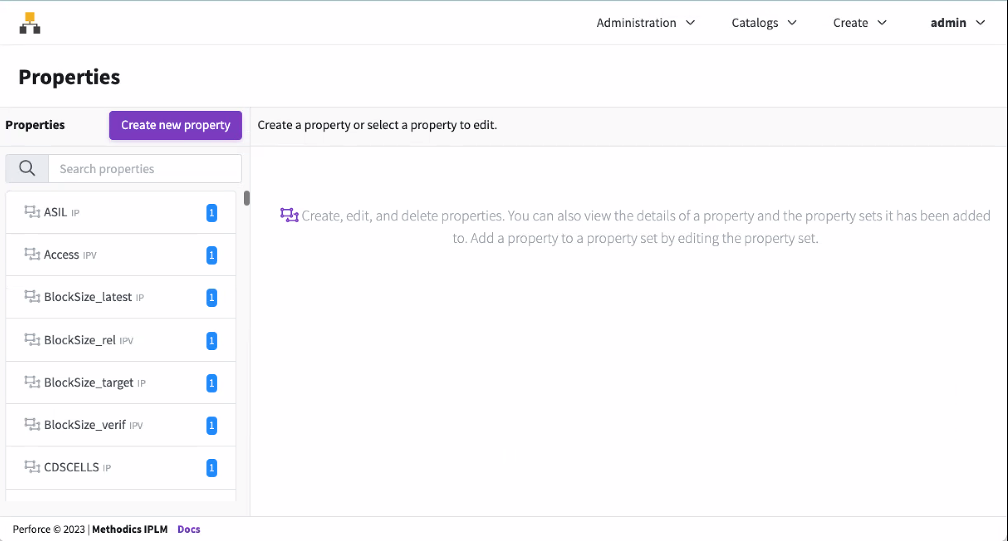
Adding a new Property
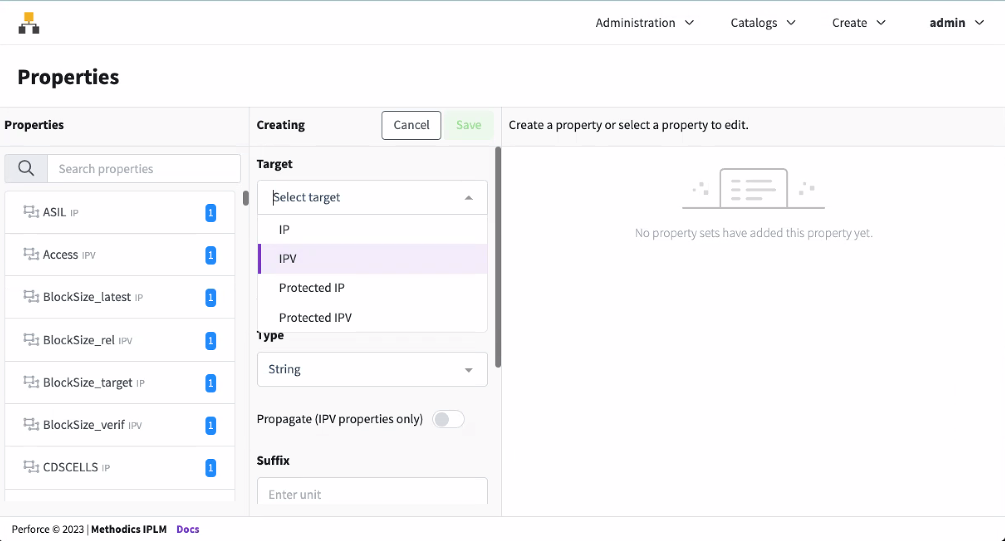
To add a new Property, select Create New Property and enter details for the new property. Choose the Property target type, either IP or IPV. This sets the type of object the given property will be attached to.
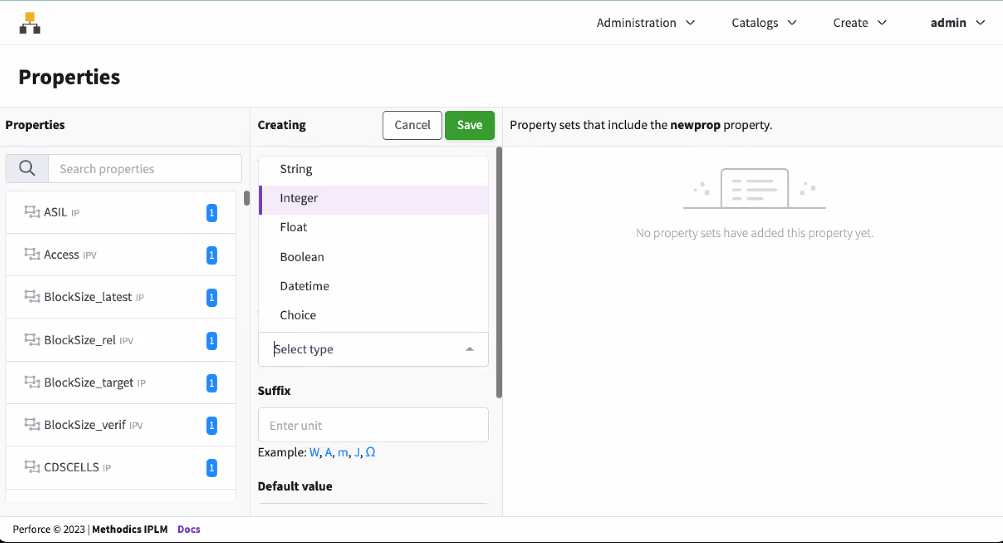
Choose the Type of the new property, this defines the data type of the Property.
Fill out the other property fields, including Name, Suffix, Default Value, and Description.
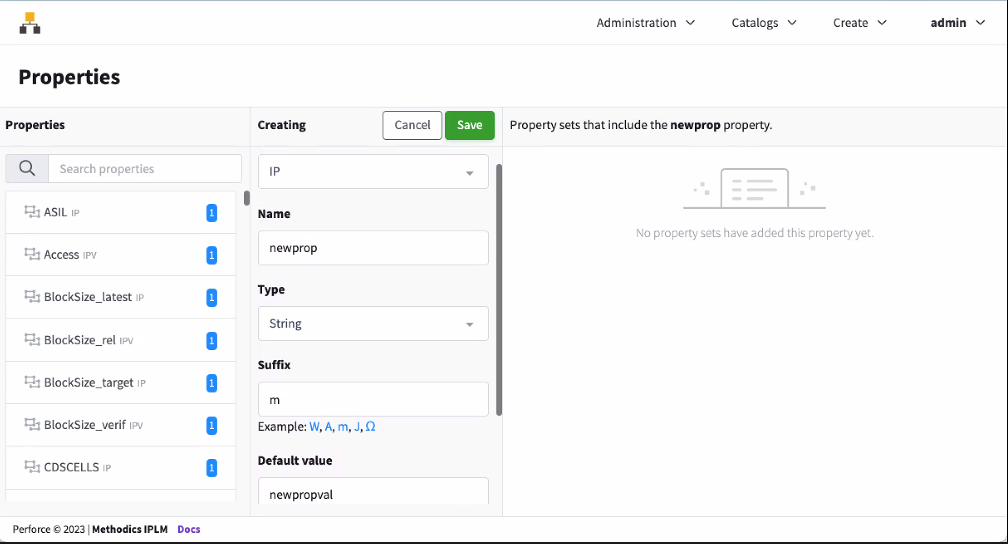
Once filled out, click Save to save the property.
Editing or deleting existing Properties
Properties in Perforce IPLM are first defined individually. Once defined, multiple properties are gathered into Property Sets. These property sets are then applied to IPs or IPVs.
Editing or Deleting an Existing Property
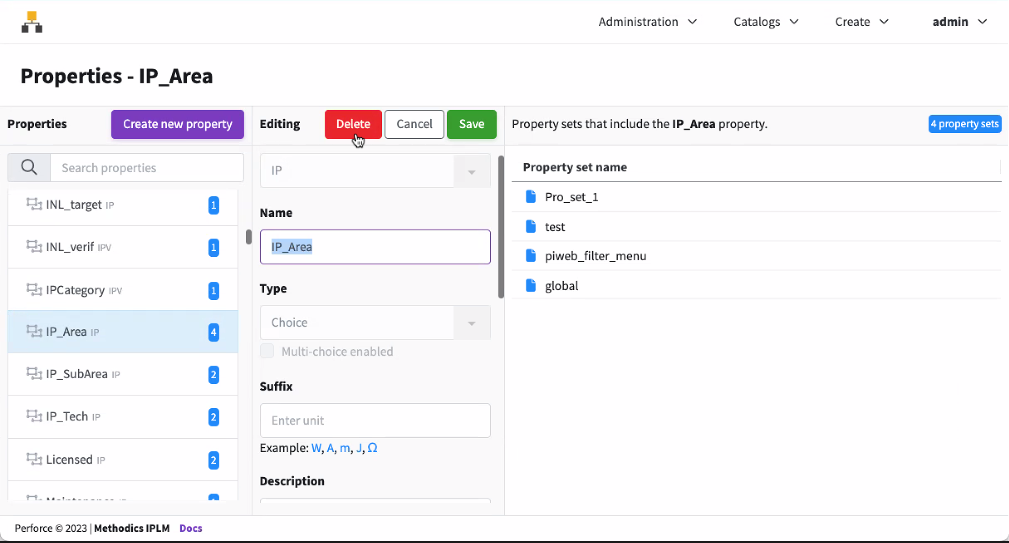
Select an existing Property to be edited. Edit the property fields, including Name, Suffix, Default Value, and Description. Once filled out, click Save to save the property. To delete the property, click the Delete button.
Command Line
Properties can be managed on the command line using the 'pi property' command
> pi prop -h
Usage: pi property [-h] SUBCOMMAND ...

Description: Commands related to Properties. These subcommands are used to
add, edit, delete and list information about Properties.

Optional arguments:
  -h, --help            Show this help message and exit

Available sub-commands:
  SUBCOMMAND
    add                 Create a new Property definition.
    delete (del, remove, rm)
                        Delete an existing Property definition.
    edit                Edit an existing Property definition.
    list (ls)           List all matching Properties.
Adding Properties
The 'pi prop add' command brings up a template form that can be filled out to configure the property.
Note
> pi prop add -h
Usage: pi property add [-h] [--template TEMPLATE | identifier]

Description: Create a new Property definition. Only admin users can create
Properties. The command puts the Property specification into a temporary file
and invokes the editor specified by the EDITOR environment variable. Saving
the file adds the Property definition.

Positional arguments:
  identifier            The name of the Property definition being created.

Optional arguments:
  --template TEMPLATE, -t TEMPLATE
                        Use the specified template to add the Property. The
                        template is an ASCII file that defines the Property.
                        This can be used to add Property definitions with a
                        script and avoid the interactive editor. To read the
                        template from STDIN, set TEMPLATE='-'.
  -h, --help            Show this help message and exit

Examples:
# Invoke the editor to create Property definition ohms.
  pi prop add ohms

# Create Property definition using the ohms.info template.
  pi prop add -t ohms.info

# Create Property using redirected STDOUT from script new_prop.py as template.
  new_prop.py | pi prop add --template -
Deleting Properties
The 'pi prop delete' command is used to remove properties that have been added to Perforce IPLM. By default if the property has been given a non-default value on any IP to which the property has been attached via property set, Perforce IPLM will block the property delete. Use the `–force` option to override this behavior and proceed with the property delete.
Note
> pi prop delete -h
Usage: pi property delete [-h] [--force] identifier

Description: Delete an existing Property definition. Only admin users can
delete Properties.

Positional arguments:
  identifier   Name of the Property to delete.

Optional arguments:
  --force, -f  Execute delete to completion when Property value is set for
               some IP or IPV (default is to block delete when Property value
               is set on any IP or IPV).
  -h, --help   Show this help message and exit

Examples:
# Delete Property definition ohms which has no value set on any IP or IPV.
  pi prop delete ohms

# Delete Property definition ohms even if its value is set on any IP or IPV.
  pi prop delete --force ohms
Editing Properties
The 'pi prop edit' command is used to edit existing properties. If a template is provided via the '–template' argument any fields provided by the template will be modified. If a field of the full template is omitted, that field will remain unchanged on the property after edit. If no template is supplied via the '–template' option then a template form is provided via editor to the manually modify the property. Administrator status is required to edit properties.
> pi prop edit -h
Usage: pi property edit [-h] [--template TEMPLATE] identifier

Description: Edit an existing Property definition. Only admin users can edit
Properties. The command puts the Property specification into a temporary file
and invokes the editor specified by the EDITOR environment variable. Saving
the file edits the Property definition.

Positional arguments:
  identifier            The name of the Property definition to edit.

Optional arguments:
  --template TEMPLATE, -t TEMPLATE
                        Use the specified template to edit the Property. The
                        template is an ASCII file that defines the Property.
                        This can be used to edit Property definition with a
                        script and avoid the interactive editor. To read the
                        template from STDIN, set TEMPLATE='-'.
  -h, --help            Show this help message and exit

Examples:
# Invoke the editor to modify Property definition ohms.
  pi prop edit ohms

# Modify Property definition ohms using the ohms.info template.
  pi prop edit -t ohms.info ohms

# Modify Property ohms using redirected STDOUT from script as template.
  edit_prop.py | pi prop edit -t - ohms
Listing Properties
The 'pi prop list' command is used to list properties that have been added to Perforce IPLM.
> pi prop list -h
Usage: pi property list [-h]
                        [--format {csv,json,long,table,template} | --verbose]
                        [--model MODEL]
                        [identifier [identifier ...]]

Description: List all matching Properties. A variety of format and filtering
options are supported.

Positional arguments:
  identifier            Filter Properties by name.

Optional arguments:
  --format {csv,json,long,table,template}
                        Return the results using the specified data structure.
                        The template format produces files that can be used by
                        the pi add|edit commands with the --template option.
  --model MODEL         Use the specified report model (table report only).
  --verbose, -v         Alias for --format long.
  -h, --help            Show this help message and exit
Configuring the Output Format
Perforce IPLM can display the list output in a number of different formats
| Command Option | Format | Description |
|---|---|---|
| --format | table | The default format option, a list of values in table format. |
| template | Lists the properties in the 'pi prop edit' CLI template format. The template format returns at most one result, and requires an identifier. | |
| long | Displays detailed information about the property, equivalent to --verbose, -v output | |
| json | Display the list of properties in json format. Note that the Perforce IPLM API should be used for scripting purposes. | |
| csv | Display the list of properties in comma separated value format. | |
| --verbose, -v | Displays detailed information about the properties, equivalent to --format long output | |
| --model MODEL | Display a custom table format MODEL defined in piclient.conf. See here for more information on configuring display models. |
Example property list output:
> pi prop list
┌───────────────────────┬────────┬──────────┬───────────┬──────────────────────────────────────────┐
│ NAME                  │ TARGET │ TYPE     │ SUFFIX    │ DESCRIPTION                              │
╞═══════════════════════╪════════╪══════════╪═══════════╪══════════════════════════════════════════╡
│ ControllabilityClass  │ IP     │ string   │           │ Controllability Classification           │
│ ExposureClass         │ IP     │ string   │           │ Exposure Classification                  │
│ FUSASpec              │ IP     │ string   │           │ FuSa specification                       │
│ FUSA_spec_rev         │ IP     │ string   │           │ Internal FuSa compliance guideline       │
│                       │        │          │           │ revision                                 │
│ INL_latest            │ IP     │ float    │ ppm       │ Integral Non-Linearity Latest            │
│ INL_rel               │ IPV    │ float    │ ppm       │ Integral Non-Linearity Latest            │
│ INL_target            │ IP     │ float    │ ppm       │ Target Integral Non-linearity            │
│ INL_verif             │ IPV    │ float    │ ppm       │ Integral Non-Linearity Verification      │
│                       │        │          │           │ Result                                   │
│ IPCategory            │ IPV    │ choice   │           │ IP Catetory                              │
│ SNR                   │ IPV    │ float    │ dB        │ Measured Signal to Noise Ratio           │
│ SeverityClass         │ IP     │ string   │           │ Max Severity class                       │
│ Supply_target         │ IP     │ float    │ V         │ Targeted Supply                          │
│ TempHi_target         │ IP     │ float    │ C         │ Target High Temperature                  │
│ TempLow_target        │ IP     │ float    │ C         │ Target Low Temperature                   │
│ architecture          │ IP     │ string   │           │ cortex architecture                      │
│ auth_required         │ IP     │ string   │           │ is authorization required to use the IP  │
│ bus_interface         │ IP     │ choice   │           │ Bus interface protocol                   │
│ external_ip           │ IP     │ string   │           │ Is IP external                           │
│ license_agreement     │ IP     │ string   │           │ License agreement doc                    │
│ license_class         │ IP     │ string   │           │ licensing class for the IP               │
│ license_expire        │ IP     │ datetime │           │ License expiration date                  │
│ license_start         │ IP     │ datetime │           │ License start date                       │
│ vendor_id             │ IP     │ string   │           │ IP vendor ID number                      │
│ vendor_ipid           │ IP     │ string   │           │ IP vendor IP ID number                   │
└───────────────────────┴────────┴──────────┴───────────┴──────────────────────────────────────────┘
Found 24 matching object(s).