Multisite considerations
Instructions for deploying Perforce IPLM and Perforce Core in Multisite scenarios and links to related documentation.
Perforce highly recommends using Perforce Core as the backend data management solution for multisite teams. Perforce Core has industry leading performance and support for distributed teams.
Important: We recommend you contact IPLM Solutions to assist in completing the procedures listed in this section.
Multisite deployment topology
The typical multisite deployment of Perforce IPLM with Perforce Core is shown below:
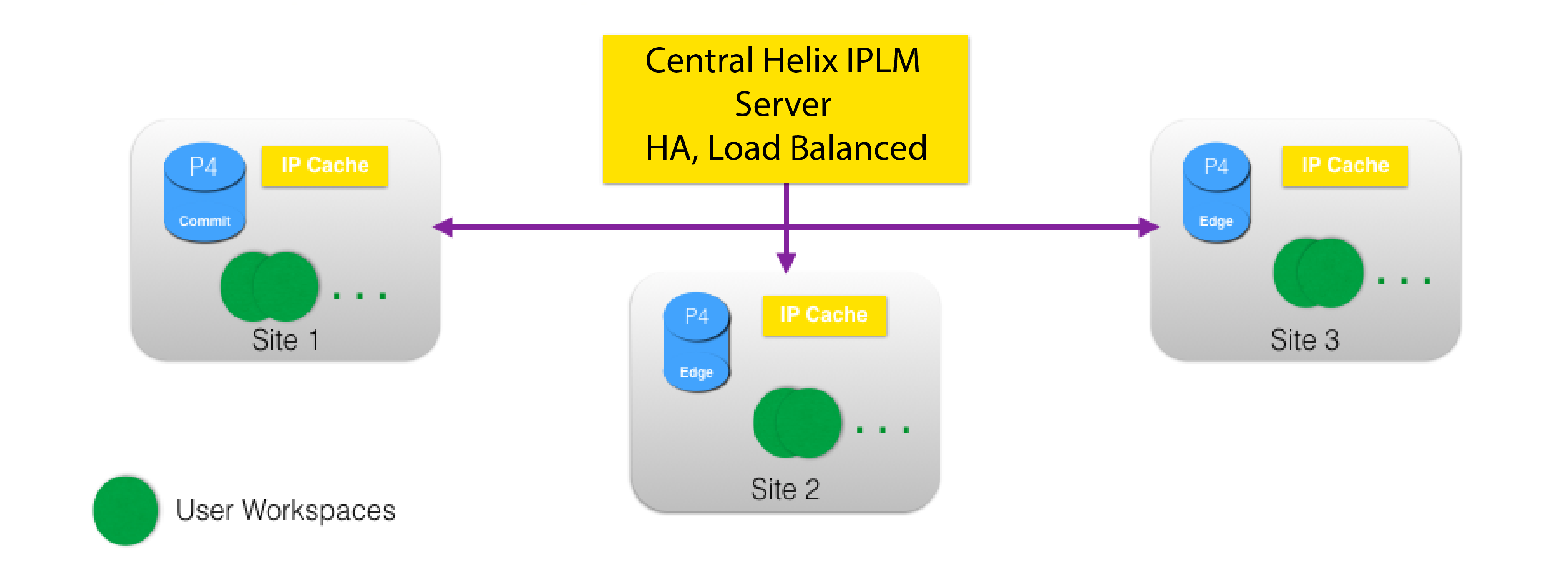
As shown, the deployment topology includes:
- A central Perforce IPLM server which can be enterprise hardened using Perforce IPLM HA Architecture
- A central Perforce Core server, with similar enterprise characteristics. Note that the central Perforce IPLM server is usually co-located on the same site with the Perforce Core server.
- A Perforce Core replication method on each remote site of some significance. Larger remote sites can have Perforce Core Edge servers, smaller remote sites can have forwarding replicas. Tiny remote sites can use a nearby larger site's infrastructure if needed.
- An IP Cache (also called a 'BuildIC server') in each of the larger remote sites. This IP cache is populated using data from the nearest Perforce replication method, or the main Perforce commit server if the IP cache is located on the main site.
Setting up a multisite deployment
To set up a multisite deployment of Perforce IPLM and Perforce Core, complete the following steps:
Setup Perforce IPLM Ser
Use the same Perforce IPLM setup and installation described here: Perforce IPLM Deployment and Installation Guide
Set up Perforce Core Replication on remote site
Perforce has several articles and guides on how to set up a remote site replication, and the various pros and cons of the choices available. A good place to start is Helix Versioning Engine Administrator's Guide: Multi-site deployment. Some of the key points are also summarized below in the Perforce section.
Set Up IPLM Cache on remote site
Each remote site that has a Perforce replication should also have a IPLM Cache. IP Caches are very useful in quickly building workspaces and saving user time and diskspace. Standard IPLM Cache setup and configuration steps can be followed at each site to set up a IPLM Cache server. We recommend using the same configuration (e.g.: port number, configuration options) at each site, but this is not a requirement.
Perforce Core multi-site considerations
Perforce has a rich suite of solutions to manage multi-site teams including Proxy Servers and Edge Servers.
Proxy servers maintain a local copy of the depot metadata and a read-only copy of the latest files at the remote site. This means sync's and reporting are not subject to WAN latency but submit must still get sent back to the central Perforce server.
Edge servers are a full copy of the central Perforce server and users can submit their changes locally removing that bottleneck.
One drawback to an Edge server is that attention must be paid to backups since local metadata will reside on the server for some period.
Perforce Documentation
https://www.perforce.com/company/newsletter/2013/09/evolution-perforce-replicas-edge-servers
https://www.perforce.com/perforce/r16.2/manuals/p4dist/chapter.distributed.html
https://www.perforce.com/blog/131008/youre-probably-not-running-enough-archive-pull-threads
3rd Party Documentation
https://www.linkedin.com/pulse/20140827180036-68000485-perforce-commit-and-edge-servers
http://www.slideshare.net/perforce/multisite-perforce-at-netapp