pi_branch.py
This tutorial demonstrates the usage of the pi_branch.py command provided in the mdx-piextras package. This command can be used to perform both Helix (p4) and Perforce IPLM branching commands (add/list/load/merge) within a single action.
Use Models
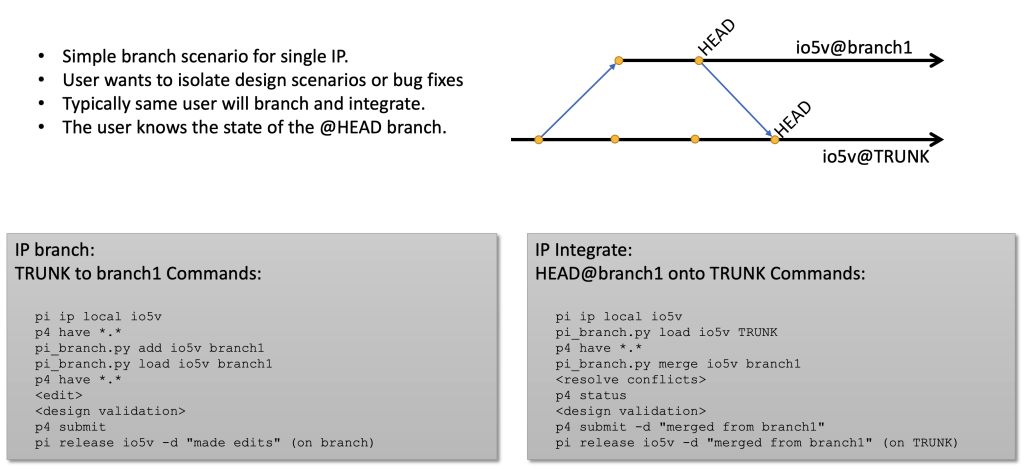
There are several primary use models for using the pi_branch.py script however only two will be discussed in the document:
- Single user branch scenario for single IP.
- User wants to isolate design scenarios or bug fixes for an IP.
- Typically same user will branch and integrate.
- Simple @HEAD use model.
- Multi-user branch scenario for single IP.
- Typically different users will branch and integrate the IP.
- The integrator does NOT know the state of the @HEAD branch.
- Simple @ALIAS use model.
SUMMARY - Branching and merging to/from HEAD
SUMMARY - Branching from HEAD, merging from ALIAS

Restrictions
For this tutorial using the pi_branch.py command some restrictions apply:
-
These commands can be used for any DMTYPE, but the file branching part will only apply for DMTYPE=P4
-
Default depot structure: //depot/<library>/<ip>/<line>/…
-
Permissions are setup correctly, the branching command will not handle any permission checking or modifications
-
A working installation of Perforce, mdx-piserver and mdx-picli is available, with all the correct environment variables set
-
Correct mapping of Perforce binary / text types, the branch commands will use Perforce commands and let Perforce handle the type detection for merging
Depot structure
When working with Perforce a certain structure is recommended to enable easy location of Perforce IPLM contents.
With Perforce IPLM, data is organized in Libraries, IP, Lines, and Releases.
With Perforce data, storage is done with depots, folders and files. A depot is a top level configuration that defines how storage for subsequent folder and files are handled within that depot.
When working with a single depot structure, it is recommended to create a new depot/bin and have nested subfolders for each Library, IP and Line, followed by the files. The recommended Perforce repository path structure for this tutorial is: //depot/<library>/<ip>/<line>/…
Database
For this document the tutorial database is used. This database is available via the mdx-piextras installation. See the Tutorial Installation for Perforce for more details on how to install this tutorial.
Branching Commands
The pi_branch.py command is available under mdx-piextras as bin/pi_user_utils/pi_branch.py, and can be added to $PATH. The first line of this script might need to modified to point to the python installation provided by the mdx-picli package.
This command will provide various subcommand. Additional help is available either via pi_branch.py help <command> or pi_branch.py <command> --help
$ pi_branch.py -h
Usage: pi_branch [OPTIONS] COMMAND [ARGS]...

Options:
-d, --debug debug information.
-h, --help Show this message and exit.

Commands:
add Add new branch.
delete (rm) Delete a branch.
help Show help for specific command.
list (ls) List branches.
load Load a branch.
merge Merge a branch.
settings Show settings.
pi_branch.py setup and configuration
Admin Setup:
pi_branch.pyis included with piextras in/usr/share/mdx/products/piextras/bin/pi_user_utils
User:
- Configure path:
export PATH=/usr/share/mdx/products/piextras/bin/pi_user_utils:/usr/share/mdx/products/piclient/local/bin:$PATH - Define alias for command:
alias pi_branch.py=/usr/share/mdx/products/piextras/bin/pi_user_utils/pi_branch.py
Design:
- The source IPV must be loaded in a workspace
- the
pi_branch.pycommand executed within the workspace.
Environment Settings
There are a few environment variables that can be used to control the pi_branch.py command
- PI_BRANCH_WS - By default the pi_branch.py will detect the current workspace root by traversing the current directory parents until .methodics/ws_manifest.json has been located.
- PI_BRANCH_PI - This variable can be used to a particular location for the Perforce IPLM cli command. By default this variable is set to pi, which is assumed to be available under $PATH
- PI_BRANCH_P4 - This variable can be used to point to a particular location for the Helix p4 cli command. By default this variable is set to p4, which is assumed to be available under $PATH
- PI_BRANCH_LABEL - This variable can be used to indicate the prefix used for temporarily tagging files used during the branching process. Default is 'p4_branch_tmp'. It is recommended to add an exclusion rule `p4_branch_tmp*` in the perforce spec depot if a spec depot has been configured.
Explanation of Automation
Automation provided by thepi_branch.py add option
- Example: create a new branch called BRANCH1
- if IP@HEAD,
- a `pi release` will be issued to mark the branch point with a new IPLM release
- a `p4 populate` will copy the source repo path @HEAD to the target repo path branch @HEAD
- p4 populate –d “description” <PREFIX>/LIB/IP/TRUNK/... <PREFIX>/LIB/IP/BRANCH1/...
- (NOTE: p4 populate is similar to p4 copy + p4 submit)
- a ‘pi ip copy’ will be issued to create a new IPLM LINE pointing to the new BRANCH1 repo path
- else if not IP@HEAD (IP@ALIAS or IP@2)
- a ‘p4 label’ is used to create a temporary label from the IPV fileset
- a ‘p4 tag’ is used to apply the label to the IPV fileset
- a ‘p4 populate’ using the label is issued to create the new branch @HEAD
- the temporary p4 label is deleted
- a ‘pi ip copy’ is issued to create a new IPLM LINE pointing to the new BRANCH1 repo path
- only branching TO @HEAD.<NEW_BRANCH> is supported
- if target branch exists the add will fail (intent may be to merge)
- if IP@HEAD,
Automation provided by the pi_branch.py merge option
- Example: IP@TRUNK is in WS, Merge from IP@BRANCH1 into IP@TRUNK
- Target branch must exist and of same DM type
- if only branch name is provided in command line.
- the filelist from the IP@HEAD.<branch> will be used for merge
- if full IPV is provided in command line,
- the filelist from the IPV will be used for merge
- if only branch name is provided in command line.
- a ‘p4 integrate’ command will initiate the merge process , merging each file in the filelist
- if conflicts, manual interventionis required
- a ‘p4 submit’ is required to complete the merge action
- only merging TO @HEAD is supported
- Target branch must exist and of same DM type
Lines vs Branches
The Perforce IPLM terminology for a branch is a line. During this tutorial when the word branch is used for IPV objects, it is implied that a line is altered.
Loading a workspace
The IP tutorial.padring is being used for this tutorial. Start by loading a workspace:
$ pi ip load tutorial.padring /tmp/ws1
Loading IPV 'tutorial.padring@5.TRUNK' into Workspace '/tmp/ws1'.
┌────────────────────┬─────────┬───────┬──────────────────┐
│ NAME               │ VERSION │ MODE  │ RELATIVE PATH    │
╞════════════════════╪═════════╪═══════╪══════════════════╡
│ tutorial.padring   │ 5.TRUNK │ Refer │ blocks/padring   │
│ tutorial.MS90G     │ 1.TRUNK │ Refer │ blocks/MS90G     │
│ tutorial.io5v      │ 1.TRUNK │ Refer │ blocks/io5v      │
│ tutorial.io_tsmc18 │ 1.TRUNK │ Refer │ blocks/io_tsmc18 │
└────────────────────┴─────────┴───────┴──────────────────┘

$ cd /tmp/ws1
$ pi ws st
Workspace ID : 1add5c3c-f732-436f-89ac-f5459d24de27
Directory    : /tmp/ws1
IP           : tutorial.padring@5.TRUNK
Workspace is up-to-date.
List Branches
To show the current branch on a particular IP:
$ pi_branch.py list tutorial.padring
Current branch for tutorial.padring@5.TRUNK: TRUNK
To show all branches available for a particular IP:
$ pi_branch.py ls padring -a
Branches for tutorial.padring@5.TRUNK:
 L1
 L2
 L3
 L4
 TRUNK
When working on resources, most of the commands will require the IP to be in local mode:
$ pi ip local io5v
Switching 'tutorial.io5v@1.TRUNK' to local mode.
Successfully switched 'tutorial.io5v@1.TRUNK' to local mode.

$ cd blocks/io5v/
$ pi_branch.py ls io5v
Current branch for tutorial.io5v@1.TRUNK: TRUNK

$ pi_branch.py ls io5v -a
Branches for tutorial.io5v@1.TRUNK:
 TRUNK
Add a New Branch
Branches are created server side, not client side. This means that all data has to be committed before a branch can be created, and local unmanaged or ignored files will be skipped. If there are any uncommitted changes detected via pi ip diff, the branch action will be aborted.
The target release for a branch is required to be @HEAD. If a line already exists for the IP, the branch action be aborted.
When the IP to be branched is on @HEAD, a release will be created to mark the branch point. The release description will contain a message “Created branch <IPV>”, where IPV will be the full name of the IPV currently in the workspace. If this release cannot be made, the branch action will be aborted.
For the branching operation the Perforce fileset from the IP to be branched will be retrieved, and those files will be tagged with a temporary Perforce label. This label is then used with a p4 populate command to branch the files to a new repository path location. The branch action is finished by doing a pi ip copy to create the new line in Perforce IPLM. For these actions the description “Branched <A> to <B>” will be used, where A is the source IPV and B is the target IPV.
Note that when using a spec depot with Perforce, it is recommended to add a line to exclude labels that start with pi_branch_tmp_ to avoid growing the spec depot. This prefix can be controlled via the –label option, or via the PI_BRANCH_LABEL variable.
When using the pi_branch.py add command a branch name is required as first argument. If this name does not contain a @ character, it will be used as line for the IPV branch action, else it can be used to indicate a target lib.ip@HEAD.line object (HEAD for release will be enforced). This enables a branch to be create outside the currently lib.ip being worked on. For example, to create a branch of a particular IP to another Library and ip use: pi_branch.py ip lib1.ip1 lib2.ip2@HEAD.TRUNK
Note that a branch can be created if the IPV does not have a DMTYPE=P4, but the file handling part will be skipped.
Example: update IP io5 to @HEAD, and create a new branch called branch1 for it:
$ pi up io5v@HEAD
Updating Workspace to Alias 'HEAD'. For large IP this could take a while.
┌───────────────┬─────────────┬─────────────────┬───────┬─────────────┐
│ NAME          │ OLD VERSION │   NEW VERSION   │  MODE │ PATH        │
╞═══════════════╪═════════════╪═════════════════╪═══════╪═════════════╡
│ tutorial.io5v │   1.TRUNK   │ HEAD.TRUNK [@1] │ Local │ blocks/io5v │
└───────────────┴─────────────┴─────────────────┴───────┴─────────────┘

$ pi_branch.py add io5v branch1
INFO: Branching tutorial.io5v@HEAD.branch1 from tutorial.io5v@HEAD.TRUNK [@2]
WARNING: Creating release for tutorial.io5v@HEAD.TRUNK [@2]
176 files branched (change 7).
Successfully created new Line 'tutorial.io5v@0.branch1'.
Load a Branch
A branch can only be loaded it if exists, else the action will be aborted. When loading a branch the pi update command will be used to load this new IPV into the workspace.
$ p4 have *.*
//mdx_test/tutorial/io5v/TRUNK/io5v_doc.pmq#1 - /tmp/ws1/blocks/io5v/io5v_doc.pmq
//mdx_test/tutorial/io5v/TRUNK/io5v.pmq#1 - /tmp/ws1/blocks/io5v/io5v.pmq

$ pi_branch.py load io5v branch1
INFO: Switching tutorial.io5v@HEAD.TRUNK [@1] to tutorial.io5v@HEAD.branch1
Updating Workspace to Alias 'HEAD'. For large IP this could take a while.
┌───────────────┬─────────────────┬───────────────────┬───────┬─────────────┐
│ NAME          │   OLD VERSION   │    NEW VERSION    │  MODE │ PATH        │
╞═══════════════╪═════════════════╪═══════════════════╪═══════╪═════════════╡
│ tutorial.io5v │ HEAD.TRUNK [@1] │ HEAD.branch1 [@0] │ Local │ blocks/io5v │
└───────────────┴─────────────────┴───────────────────┴───────┴─────────────┘

$ p4 have *.*
//mdx_test/tutorial/io5v/branch1/io5v_doc.pmq#1 - /tmp/ws1/blocks/io5v/io5v_doc.pmq
//mdx_test/tutorial/io5v/branch1/io5v.pmq#1 - /tmp/ws1/blocks/io5v/io5v.pmq

$ pi ws st
Workspace ID : 32aadb3b-d885-4de2-8cd8-cd5da98a6590
Directory    : /tmp/ws1
IP           : tutorial.padring@5.TRUNK
Resources    :
┌──────────────────┬──────────────────┬───────────────────┬───────────┬───────────────┬───────┐
│ NAME             │ EXPECTED VERSION │   LOCAL VERSION   │ WS STATUS │ SERVER STATUS │  MODE │
╞══════════════════╪══════════════════╪═══════════════════╪═══════════╪═══════════════╪═══════╡
│ tutorial.padring │     5.TRUNK      │      5.TRUNK      │  Modified │       OK      │ Local │
│ tutorial.io5v    │     1.TRUNK      │ HEAD.branch1 [@0] │     OK    │       OK      │ Local │
└──────────────────┴──────────────────┴───────────────────┴───────────┴───────────────┴───────┘
Edit files on a Branch
Making modification to a branch is the same as making changes on the default TRUNK branch.
$ cd /tmp/ws1/blocks/io5v/

$ p4 edit ./hw_code/code/mt48lc32m16a2.v
//mdx_test/tutorial/io5v/branch1/hw_code/code/mt48lc32m16a2.v#1 - opened for edit


$ vim ./hw_code/code/mt48lc32m16a2.v


$ p4 submit -d 'increased size of bus' ./hw_code/code/mt48lc32m16a2.v

Submitting change 3.

Locking 1 files ...

edit //mdx_test/tutorial/io5v/branch1/hw_code/code/mt48lc32m16a2.v#2

Change 3 submitted.
Release a Branch
Making releases on a branch is the same a release the default TRUNK branch:
$ pi release -d 'implemented increated bus feature' io5v
Successfully created 'tutorial.io5v@1.branch1'.
Merge Branches
When merging branches there are multiple Perforce actions required. The pi_branch.py merge command will perform the first step only, which is to indicate that integration is starting via the p4 integratecommand.
If a full IPV name is provided as branch, then the filelist contents of that IPV will be used, else it will retrieve the fileset from @HEAD for the line requested.
The IP must be in local mode for a merging operation.
$ pi_branch.py load io5v TRUNK
INFO: Switching tutorial.io5v@HEAD.branch1 [@1] to tutorial.io5v@HEAD.TRUNK
Updating Workspace to Alias 'HEAD'. For large IP this could take a while.
┌───────────────┬───────────────────┬─────────────────┬───────┬─────────────┐
│ NAME          │ OLD VERSION       │ NEW VERSION     │ MODE  │ PATH        │
╞═══════════════╪═══════════════════╪═════════════════╪═══════╪═════════════╡
│ tutorial.io5v │ HEAD.branch1 [@1] │ HEAD.TRUNK [@2] │ Local │ blocks/io5v │
└───────────────┴───────────────────┴─────────────────┴───────┴─────────────┘

$ pi_branch.py merge io5v branch1
INFO: Merging tutorial.io5v@HEAD.branch1 into tutorial.io5v@HEAD.TRUNK [@2]
INFO: Starting p4 integrate process

$ pi ws st
Workspace ID : 1add5c3c-f732-436f-89ac-f5459d24de27
Directory : /tmp/ws1 IP : tutorial.padring@6.TRUNK
Resources :
┌──────────────────┬──────────────────┬─────────────────┬───────────┬───────────────┬───────┐
│ NAME             │ EXPECTED VERSION │ LOCAL VERSION   │ WS STATUS │ SERVER STATUS │ MODE  │
│ tutorial.padring │ 5.TRUNK          │ 5.TRUNK         │ Modified  │ OK            │ Refer │
│ tutorial.io5v    │ 1.TRUNK          │ HEAD.TRUNK [@2] │ Modified  │ OK            │ Local │
└──────────────────┴──────────────────┴─────────────────┴───────────┴───────────────┴───────┘
$ p4 status ...
hw_code/code/mt48lc32m16a2.v - submit change default to integrate //mdx_test/tutorial/io5v/TRUNK/hw_code/code/mt48lc32m16a2.v#1
... - no file(s) to reconcile.
If there are any issues detected during the merging process, then those will need to be addressed with Perforce commands:
Manual Intervention:
If conflicts, you can use the following set of commands:
p4 status
p4 resolve -as|-am|-af|-at|-ay
p4 diff
p4 resolve (see "p4 help resolve" for more details)
p4 submit -d "merged branch <branchname>”
The user needs to resolve the integration action, and commit the merge via a p4 submit and/or pi release action.
$ p4 resolve -am hw_code/code/mt48lc32m16a2.v
/tmp/ws1/blocks/io5v/hw_code/code/mt48lc32m16a2.v - merging //mdx_test/tutorial/io5v/branch1/hw_code/code/mt48lc32m16a2.v#2
Diff chunks: 0 yours + 1 theirs + 0 both + 0 conflicting
//ws:mdxtest::admin:tutorial.padring:21275d39/blocks/io5v/hw_code/code/mt48lc32m16a2.v - copy from //mdx_test/tutorial/io5v/branch1/hw_code/code/mt48lc32m16a2.v

$ p4 submit -d 'merged from branch1' ...
Submitting change 4.
Locking 1 files ...
integrate //mdx_test/tutorial/io5v/TRUNK/hw_code/code/mt48lc32m16a2.v#2
Change 4 submitted.

$ p4 filelog hw_code/code/mt48lc32m16a2.v
//mdx_test/tutorial/io5v/TRUNK/hw_code/code/mt48lc32m16a2.v
... #2 change 4 integrate on 2018/10/05 by admin@ws:mdxtest::admin:tutorial.padring:21275d39 (text) 'foo'
... ... copy from //mdx_test/tutorial/io5v/branch1/hw_code/code/mt48lc32m16a2.v#2
... #1 change 1 add on 2017/07/07 by admin@localhost (text) 'init_checkin'
... ... branch into //mdx_test/tutorial/io5v/branch1/hw_code/code/mt48lc32m16a2.v#1
More details on integrating branches and resolving conflicts in Perforce can be found here: