Zero-Downtime IPLM upgrade procedure summary
Instructions for performing zero downtime upgrades of Perforce IPLM services.
The deployment used in consideration of developing the procedure:
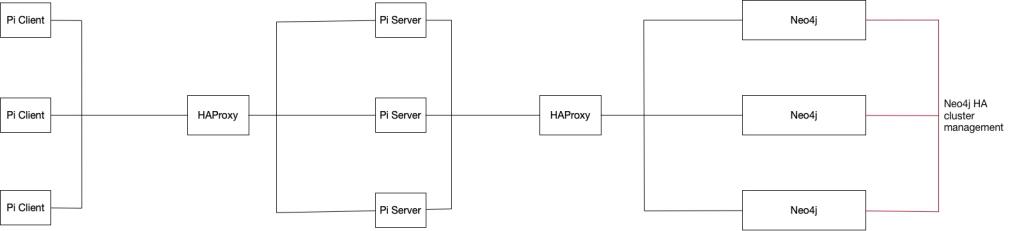
Main Points:
- IPLM Server version 2.30.0 and above is backwards compatible with the immediately preceding IPLM Client version (2.29.x in the case of server version 2.30.0).
- The IPLM Server and Neo4j instances are upgraded first with HAProxy configured to stall traffic to the IPLM Servers while the upgrade is in progress
Upgrade procedure
- Customer updates their scripts to handle the soon-to-be upgraded version of Pi, as needed.
- Copy/save-off configuration files to a safe location, for example:
- /usr/share/mdx/config/mdx.bash
- /etc/mdx/piserver.yml
- /usr/share/mdx/neo4j/current/conf/neo4j.conf
- /etc/haproxy/haproxy.cfg
-
Find which node contains the Neo4j master. For example, the
curlcommand can be used to access the Neo4j HA endpoint /db/manage/server/ha/master on a node, e.g.$ curl -v 10.211.55.7:7474/db/manage/server/ha/master. This endpoint returnsHTTP/1.1 200 OKwhen accessing the master instance, and returnsHTTP/1.1 404 Not Foundwhen accessing a slave instance. On stopping the Neo4j cluster instances, the slaves are stopped first and then the master, to avoid an unnecessary failover. Likewise, on restarting, the master is started first and then the slaves. -
Referring to the HAProxy interaction between client timeout and incoming request delay section below, configure HAProxy to delay every incoming request by an amount less than the PiServer authorization tolerance period for the PiServer being upgraded to: for version 2.30.0 and greater, this is 30 minutes, so using a value of 10 minutes will work. During this period, the slave Neo4j instances, the master Neo4j instance, and the PiServer instances on all nodes must be stopped, the PiServer packages on these nodes upgraded, and the instances restarted. In /etc/haproxy/haproxy.cfg, the defaults section and the PiServer frontend can be modified to:
... defaults: ... # timeouts for normal use when not performing upgrade (30s is just an example) #timeout client 30s #timeout server 30s # timeouts for upgrading to 2.30.0 and later (MUST be less than 30 minutes) timeout client 10m timeout server 10m ... ... frontend piserver_front bind *:3001 # delay every incoming request by the same amount as 'timeout client' is set to # delay for upgrading to 2.30.0 and later (MUST be less than 30 minutes) tcp-request inspect-delay 10m tcp-request content accept if WAIT_END stats uri /haproxy?stats default_backend piserver_feed -
Signal HAProxy to reload its configuration:
# service haproxy reload
-
On each PiServer node run one of the following commands to determine when the in-progress PiServer jobs are finished. The
ssutility supersedes thenetstatutility, though for an older Linux distro there may only benetstat. In the following commands, PiServer is connected to on port 8080. Replace '8080' with the actual PiServer port if the deployment uses a different port.
Note that the TCP TIME_WAIT state is being ignored. This is the time an IP datagram can live and is used to wait for any retransmissions of lost packets on the closing of a socket and is typically 1 to 4 minutes. If the administrator wants to wait for the TIME_WAIT state to expire, just remove the lastgrep -vpart. Also note thatssidentifies this state asTIME-WAIT, whilenetstatidentifies it asTIME_WAIT.$ ss -ant | grep 8080 | grep -v TIME-WAIT
or
$ netstat -ant | grep 8080 | grep -v TIME_WAIT
When the command shows only one socket in the LISTEN state, then that PiServer's jobs have been drained.
$ ss -ant | grep 8080 | grep -v TIME-WAIT
LISTEN     0      100                      :::8080                    :::*
When there are PiServer jobs in progress, the command will show other sockets in different states, for example:$ ss -ant | grep 8080 | grep -v TIME-WAIT ESTAB 0 0 127.0.0.1:44530 127.0.1.1:8080 ESTAB 0 0 127.0.0.1:44697 127.0.1.1:8080 LISTEN 0 100 :::8080 :::* ESTAB 347 0 ::ffff:127.0.1.1:8080 ::ffff:127.0.0.1:44697 ESTAB 0 0 ::ffff:127.0.1.1:8080 ::ffff:127.0.0.1:44530
When all PiServer instances' jobs are finished (
ssornetstatshows only one LISTENING socket for each of them), then continue to next step to stop the piserver services. -
Stop the PiServer and Neo4j instances first on the nodes in which the Neo4j instances are the slave instances, then stop the PiServer and Neo4j instance on the node containing the master Neo4j instance:
# service piserver stop
-
Upgrade the PiServer packages on all nodes. For example, on a CentOS system:
# yum upgrade -y mdx-piserver.x86_64 mdx-piserver-tools.noarch
-
Restart the PiServer and Neo4j instances first on the node that contained the master Neo4j instance, then start the services on the former slave nodes:
# service piserver start
-
Update the HAProxy configuration to allow traffic through normally, for example by reconfiguring the defaults' section timeouts and commenting out the
tcp-requestlines:... defaults: ... # timeouts for normal use when not performing upgrade (30s is just an example) timeout client 30s timeout server 30s # timeouts for upgrading to 2.30.0 and later (MUST be less than 30 minutes) #timeout client 10m #timeout server 10m ... ... frontend piserver_front bind *:3001 # delay every incoming request by the same amount as 'timeout client' is set to # delay for upgrading to 2.30.0 and later (MUST be less than 30 minutes) #tcp-request inspect-delay 10m #tcp-request content accept if WAIT_END stats uri /haproxy?stats default_backend piserver_feed -
Monitor the nodes' /var/log/mdx-neo4j/debug.log files or use the
curlcommand above, and once a master Neo4j instance is up, signal HAProxy to reload its configuration:# service haproxy reload
-
Upgrade the Pi Client package, e.g. v2.30.0. It is envisioned that this will be done in an NFS store so all users of the client (scripts and people running it manually) will all have access to it at the same time. For example, on a CentOS system:
# yum upgrade -y mdx-picli.x86_64
Using this procedure in which HAProxy stalls traffic:
- It is possible to upgrade PiServer even when the Neo4j extension schema changes. Additional time may be needed when the database has to be migrated to the new schema.
- It is possible to upgrade Neo4j. If the Neo4j data store changes, additional time will be needed to migrate the database to the new store.
HAProxy interaction between client timeout and incoming request delay
From the HAProxy Configuration Manual:
- The timeout client <timeout> configuration applies when the client is expected to acknowledge or send data. It is highly recommended that the client timeout remains equal to the server timeout in order to avoid complex situations to debug. This parameter is specific to frontends, but can be specified once for all in "defaults" sections.
- The tcp-request inspect-delay <timeout> configuration is used to set the maximum allowed time to wait for data during content inspection. This statement simply enables withholding of data for at most the specified amount of time. The client timeout must cover at least the inspection delay, otherwise it will expire first.
- The tcp-request content accept if WAIT_END configuration either returns true when the inspection period is over, or does not fetch.
From the above information and by testing it was found that the timeout client timeout value must be greater than or equal to the tcp-request inspect-delay timeout value. Otherwise, under normal operations in which requests proceed to completion with the delay, after the timeout client period HAProxy determines that the client is not present and after four times the timeout client period the request returns in error (a pi command will return a traceback indicating "Can't parse headers").
Under the previous section's sequence of operations, in which the delay is removed after the upgrade is complete and HAProxy signaled to reload its configuration, a delayed pi command will return without error after the timeout client period, starting upon the issuance of the pi command.
Note that as of IPLM Server version 2.30.0, the authorization tolerance period between the issuance of a command by IPLM Client and the reception of a command by PiServer has been extended to 30 minutes. This means that the timeout client timeout value, and by the recommendation to keep the timeout server timeout value the same, and the tcp-request inspect-delay timeout value can all be set to a bit less than 30 minutes. But whatever timeout client is set to, the delayed pi commands will return upon the expiry of the timeout client period. It may take some experimentation to see how quickly an upgrade can be done, and set the timeout client, timeout server, and tcp-request inspect-delay timeout values to something a bit more than the time it takes to upgrade so as to not unnecessarily delay the requests.
IPLM Server Upgrade Note:
mdx-piserver version and the mdx-piserver-neo4j-plugin must be at the same version.